Problem
Two colleagues have spent approximately 200 hours configuring a shared AI-assisted workspace using ChatGPT, iCloud Drive, a custom MCP server and OpenAI's secure tunnel.
Although one user can access the shared files, the second encounters authentication errors, preventing them from launching their collaborative pilot.
Expected Outcome
Both colleagues can independently use their own ChatGPT accounts to access, edit and manage the same live project files, including code, scripts and documents.
Changes made by either person should be available to the other, allowing them to continue work seamlessly without duplicating files, losing progress or repeatedly explaining project context.
Solution
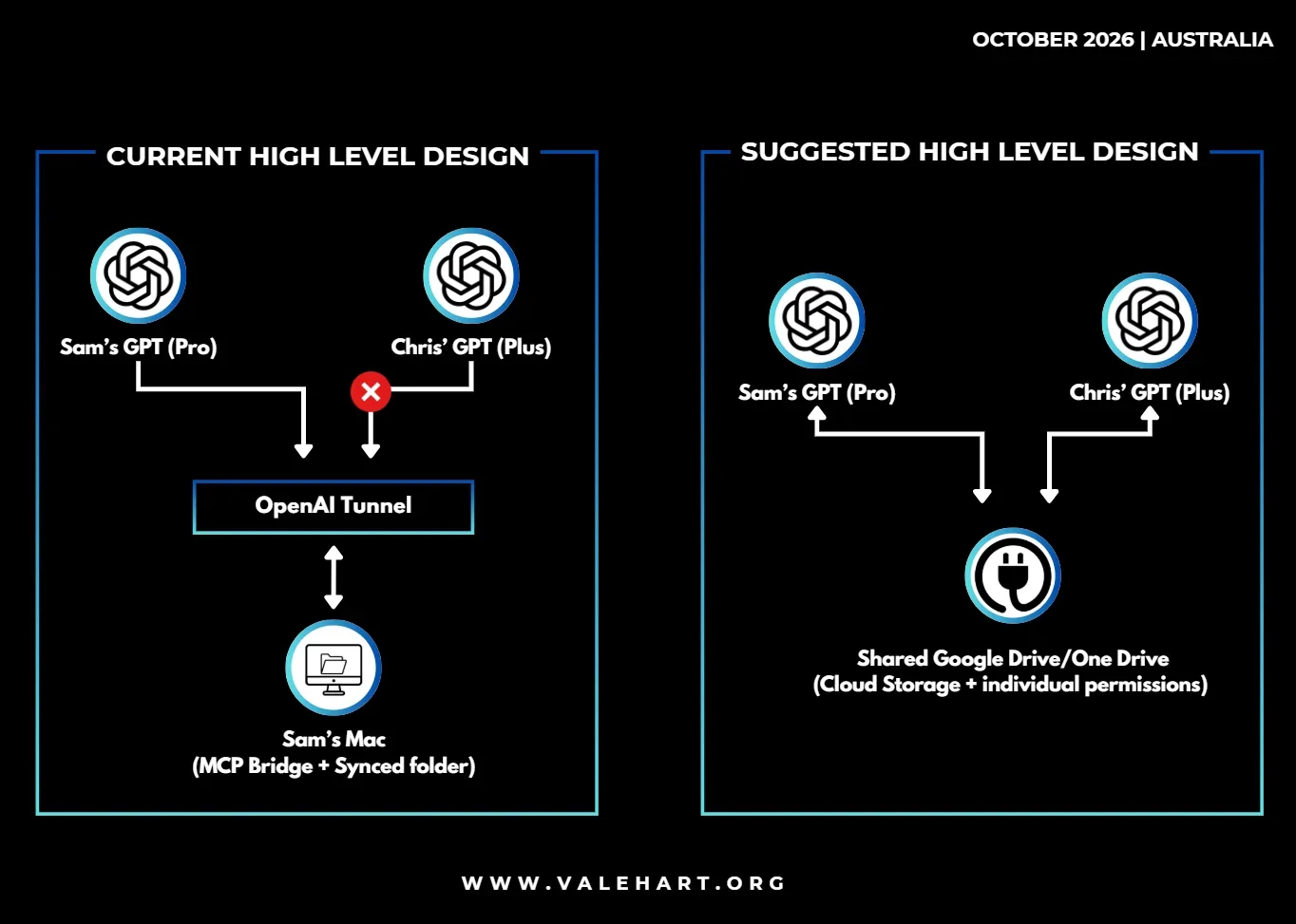
The existing setup demonstrates that the custom MCP server and secure tunnel can successfully provide access to shared files. However, the architecture introduces additional complexity through authentication requirements, workspace permissions and reliance on a locally hosted Mac.
Given the objective of enabling two people to collaborate on the same AI-assisted business project, a simpler approach may be possible using the services already available.
1. GitHub for Code and Development
GitHub can serve as the central repository for project code, scripts and version history. Each user can access the same repository through their own GitHub account, with changes tracked through commits, branches and pull requests.
Codex can support AI-assisted development, allowing both users to make changes to the same codebase while preserving version history.
GitHub's Free plan provides sufficient core collaboration functionality for an initial two-person pilot.
2. Google Workspace for Shared Documents
Google Drive can provide a central location for shared business documents, with individual access permissions and automatic synchronisation.
Where supported, ChatGPT's Google Drive integration allows users to retrieve current documents through their own authenticated connections, potentially eliminating the need for a custom MCP bridge for document retrieval.
3. ChatGPT for Shared Project Context
The existing shared ChatGPT Project can continue to provide common instructions, reference material and conversation history.
However, shared Projects do not automatically synchronise independent AI sessions, local development environments or uncommitted code changes. GitHub and Google Workspace should remain the authoritative sources for project files.
4. Reassess the Need for a Custom MCP Server
A custom MCP server may still be appropriate where specialised integrations or actions are required beyond the capabilities of native connectors.
If existing integrations satisfy the project's requirements, removing the tunnel would reduce maintenance overhead and eliminate the dependency on Sam's Mac remaining online.
If the custom MCP server is retained, its authentication configuration, workspace permissions, file-access restrictions and supported read/write capabilities should be reviewed.
Validation Through a Small Pilot
Before migrating files, upgrading subscriptions or investing further time in the tunnel, the proposed architecture can be evaluated through a simple collaboration test:
Both users independently access the same GitHub repository.
One user modifies a script using Codex and commits the change.
The second user retrieves the updated code and continues development.
Both users access a shared Google Workspace document and verify that changes are reflected.
The shared ChatGPT Project is used to maintain common project instructions and reference context.